TL;DR
I’m building an ambitious software project alone, and the whole AI bill is a $20-a-month Claude subscription. Everything that needs doing (code, content, product planning, resourcing) runs as plain-text workflows in an Obsidian vault. I write a detailed note, Claude and I turn it into a plan through rounds of questions and answers, and the work runs against tests and use cases. The mechanical work is delegated. The direction, the user experience and the writing stay mine. When I hit the session limit, I put down the task at hand and switch to the backlog only I can work through.
Third time’s a charm
Quite a few of my side projects have died on the vine, and not because they were bad ideas. They simply required more time than I had available.
What I’m working on now is my third ground-up attempt at roughly the same idea. The first two were a Python package called Ozwald, an LLM provisioner built around vLLM. The provisioner was never the point on its own. It was meant to be the foundation for a service on top of it, and that service is what I’m building now: a tool for sharing what AI agents work with. I’ll say more about that soon.
Two solid efforts, and both stalled for the same reason the side projects did. They were too ambitious to be the work of one developer, working the way I was, in the time I had. This time the difference isn’t a new architecture or heroic hacking sessions on evenings and weekends. It’s process.
The workflows
Every piece of work starts as a prompt note in the vault: a goal, my detailed notes, and a set of instructions. From there:
- Claude starts building the plan, with a short summary and a numbered list of open questions. No code changes yet.
- I answer the questions in a response round, a note of its own that I send back to Claude. Claude answers with either another round or, if the whole plan is now well-understood, an approved plan. It takes as many rounds as it takes.
- An approved plan runs against the tests and a suite of use cases.
- PRs are reviewed in independent sessions and change sets are refined until they meet the acceptance criteria.
- The executor keeps a handoff ledger as it goes, so a lost session or a full context window costs me a few minutes to restart, not hours of duplicated work.
If we’re writing or refactoring code, everything happens in a git worktree: a separate checkout on its own branch, so a plan that goes sideways never touches the main one. All the rest is markdown in a git repository. Nothing lives in a chat history.
Lately, the same machinery runs a lot more than the code. The workflows I use today:
- roadmap: the project roadmap, its milestones and its open questions
- development: turns a milestone into plans
- maintenance: triages new issues into plans
- content: takes a post from a seed to a series of drafts to a merge request on one of my sites
- hard decisions: puts a question to an advisory board of nine personas. Their views often conflict, and the conflict usually boils down to a few simple questions that make the decision easier.
- dashboard: a one-page view of where the whole project stands
My goal is to automate as much of the work of maintaining an ambitious software project as I can, and still give it the support, documentation and test pipeline a tool people depend on needs.
What didn’t work
Before the workflows, I tried autonomous agents.
OpenClaw was first. I set up a crew of agents, and it turned into a shallow rerun of the original Star Trek crew, led by an orchestrator named Capn. Capn picked up one of my sarcastic replies, “It’s probably fine.”, and made it a catchphrase. I bailed. There can be only one.
Hermes was next. It has a neat trick, writing its own skill files, but once I’d spent some time with it, my last journal entry on the topic put it this way: “the Hermes agent thing has boiled down to prompt engineering and a cronjob.”
Both efforts were also attempts at building agents in a box, firewalled away from the docs and cryptographic keys and whatever else needs to not get sent to the wider internet.
That part went better. OpenClaw ran in Docker via NeoClaw/OpenShell, and that sandbox worked well enough, but in an awkward sort of way. I gave the Hermes agents a whole QEMU virtual machine, thinking it was a better-known, more flexible way to sandbox the agents. In practice, I took down every Mac on my home network with a misconfiguration and I spent way more time fiddling with the VM than it was ultimately worth.
What did work
Now I’m running separate user accounts on my workstation for each major project and each has its own set of application configuration (Claude’s included), its own KDE activity, and its own Obsidian vault. So I log in to KDE as myself, switch to the activity (distinct, named virtual desktops) that I want to work on, and the favorites menu gives me links to my IDE, terminal and Obsidian vault, which run not as my main account, but as the separate per-project user that can’t access my files.
Autonomous crews lost. Human-steered workflows on plain-text notes won. I’ll give them the rematch they deserve at some point…after I get a bunch of work done.
What’s automated, and what stays mine
The line I’m drawing:
- Mine: the big picture, the direction of the effort, the user experience, and the writing.
- Automated: the mechanical work: plans, code against tests, issue triage, the dashboard, and the steps between a draft piece of content and a merge request.
- Shared: editing, where I write and the AI goes over it with me; and support, mostly me, with an AI assisting my efforts.
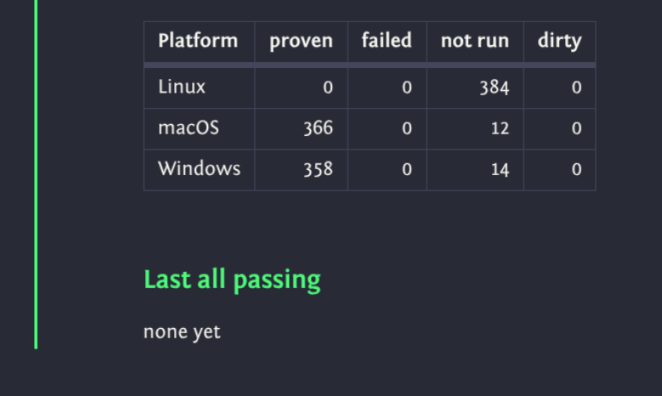
I dictate the use cases each milestone must support, and I have an agent make sure each use case is represented in the test suite. The release milestone isn’t done until every one of its test cases passes on Windows, Linux and Mac. “Done” means the use cases are all supported.
The limitations of the $20 subscription actually help move the project forward. I’ve stopped treating the dwindling token supply as a problem to work around. It works like the end of a block of time set aside for focused work: when I hit it, I put down the task at hand and switch gears to the backlog of things only I can do.
What’s next?
When I first started using the AI assistant in PyCharm, I was quickly able to level up my throughput. I never tried to measure it. My hunch is it’s tough to get either an accurate measurement or a helpful estimate. Having a tool changes the tasks you’re willing to undertake. You’re trying to compare scores in a game league before and after all the rules changed. With that said, I feel like I was at least twice as fast, maybe five times. At least some of the time.
Switching to Claude Code multiplied the throughput again, both by being a smarter, more capable tool and by giving me a practical flow for working on a larger number of complex tasks at the same time.
I think integrating Obsidian into my development pipeline is the next big multiplicative force. I grew the workflows organically, starting with an awkward collection of snippets, structured conversations, and institutionalized conventions that “stuck” and added a lot of value. Now, because I gradually sped up each of the workflows I was already doing, one successful experiment at a time, I’m starting to glimpse the flywheel that will let me manage this neato project I’ve been going on about for the past few years.
Stay tuned!